Monday, February 13, 2012

Exchange 2010 SP2 Update Rollup 1 Available

An update for Exchange 2010 SP2 has just released and can be downloaded at: Exchange 2010 SP2 Update Rollup 1 Download. This will take you Exchange version up to 14.2.283.3

For a description of all the included fixes, see KB 2645995

For those of you running DAGs, please see the following article: Applying Updates to Exchange 2010 SP1 and SP2

If you are running third party products (like anti-virus, etc), it is important that you disable them before updating.

Wednesday, February 8, 2012

Lync Snooper: More Than Just Log Analysis (Reporting)

I recently ran across some great features in the Snooper tool that I not very aware about.  Snooper is part of the Resource Kit Tools and is primarily used to analyze logs generated from the Lync Server Logging Tool.

When Snooper is open, clicking on the “Reports” menu will expose options for querying the backend database for errors, user activity, conferencing statistics, etc.

Lync - Snooper - Reports menu

Error Analysis…

When clicking on the “Error Analysis…” option, you will need to fill in the blanks for the Lync SQL instance that holds the Monitoring database.  This report will show errors generated by client programs.

Lync - Snooper - Analyze error reports

Here you have the option of searching for errors by user or by error.  Also, selecting the “Generate Error Report” option will give a web view of the report.  Below are example outputs.

Lync - Snooper - Analyze error reports - list

Lync - Snooper - Analyze error reports - generate

Conferencing and Presence…

The “Conferencing and Presence” option has several great reports to choose from.  Start by entering in the SQL instance name that contains the backend RTC database, then choose the report to run.  A few example report outputs follow.

Lync - Snooper - Conf Pres reports

User

The User report has a ton of information in it.  By searching on a user’s sip address, a few of the things that can be seen include:

  • Pool information
  • Contact information
  • Conferencing data
  • Certificates provisioned to user

Lync - Snooper - Conf Pres reports - user1

Lync - Snooper - Conf Pres reports - user2

Conference

I was really impressed by the Conference reports.  By searching on a conference ID, a few of the things that can be seen include:

  • Conference scheduling time
  • Access times
  • Invitees and roles
  • MCUs used
  • Which attendee used which MCUs

Lync - Snooper - Conf Pres reports - conf1

Lync - Snooper - Conf Pres reports - conf2

I am not showing examples of the Resolve Conference, MCU Health, or Diagnostic reports.  Check them out, there is some great information.

Stored Procedure Error Analysis…

This report shows SQL stored procedure errors over a specified block of time.  Start by entering in the SQL instance name that contains the Lync databases, then choose a date range.  This will list and graph any errors found.

Lync - Snooper - Stored Proc reports

I know I will definitely be using Snopper then more than just log analysis.  Hope this helps.

Sunday, January 29, 2012

Lync January 2012 Client Updates Released

Just released, a minor update to the Lync client

Clients (7577.4061)

From the KB, looks like it only addresses one issue:

2670467 Large increases in load on the OrgID service because of recurring authentication requests from Lync 2010

Thursday, January 26, 2012

Exchange 2007 SP3 Update Rollup 6 Available

An update for Exchange 2007 SP3 has just released and can be downloaded at: Exchange 2007 SP3 Update Rollup 6 Download

This brings the build number to: 8.3.245.2

  • For a description of all the included fixes, see KB 2608656

If you have a clustered environment, please see this article: Applying Exchange 2007 Update Rollups to Clustered Mailbox Servers

If you are running Forefront, it is important to disable Forefront protection during the update:

  • Before running patch: fscutility /disable
  • After running patch: fscutility /enable

Also remember to disable or remove all third party software during the upgrade (like antivirus, backup agents, disclaimers, etc.)

Monday, January 23, 2012

OCS R2 January 2012 Updates Released

Microsoft has released a few updates for OCS 2007 R2.

Here are the components that were updated for this round of updates:

Server Updates (6907.244) - KB 968802

Note: As always, the easiest way to make sure your server is up to date across all components is to use the Cumulative Server Update Installer (ServerUpdateInstaller.exe package)

Client Updates

Group Chat (6907.244)

Monday, January 16, 2012

My “Go To” Lync Devices

I am constantly trying out new devices.  In fact, if I don’t have anywhere from 6-10 different devices within reach then it must be time to restock.  Even though I am constantly going through devices, I always rely on my favorites at the end of the day. 

When using Lync, you don’t have to be stuck with one device.  This is something that I preach all the time.  Devices are personal and scenarios dictate the use of different devices.  This post will list my “go to” devices and why/how I use each device.

Plantronics Savi 740-MPlt Savi 740

Where: Office

This is one of my newest devices and I absolutely love it.  This device has some great advanced functionality (3-way pairing with desktop, cell phone, and PBX phone), but I only really use it with Lync.  The Savi 740 is DECT and allows me to roam my house, take out the trash, get another cup of coffee without worrying about range (300 feet) and also have confidence in the headset controls for answer/mute/volume.  I recommend this device for any office user that is constantly moving around.

Jabra Speak 410Jabra 410
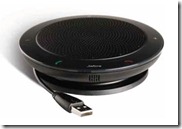
Where: Office AND Backpack

I love this speakerphone so much that I have two of them.  This is my everyday speakerphone in my office and also my travel speakerphone.  It is a very simple device, with buttons to have complete control of the phone call on the device, and the profile is perfect for traveling.  It has outperformed all other Lync speakerphones that I have tried out.  You can’t have too many of these.

Plantronics Voyager Pro UCPlt Voy Pro
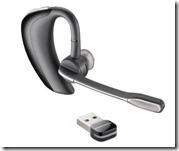
Where: Backpack

This used to be my office wireless headset as well, but I really needed DECT for the range.  Now I use this as my primary travel device and bluetooth device for my cell phone.  I actually posted a review on this device already.  I can’t say enough about it, it is so comfortable there is no issue wearing it all day and the quality is great.

Plantronics Blackwire 420Plt Black 420
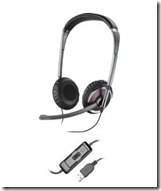
Where: Backpack

This has been my go to wired headset for quite sometime.  I had a Blackwire 435 for exactly a week before I gave it away to a person in need (I do this quite often with my devices…spread the love).  The 435 looks great, but didn’t use it enough to give a review on it.  When wearing the Blackwire 420, you just feel like you are wearing a great quality headset.  The headset folds flat and comes with a great travel case.  Even with all the fancy wireless and IP devices out there, you should really should have a solid wired headset in your stash.

Polycom CX700Polycom CX700

Where: Office

I can’t really say I use this device much, in fact a barely use IP phones at all.  I primarily keep this device around to have an IP phone to log into in order to test calls and logins to other environments that I am deploying.  Every once in a while I will take a real call on it, but it is mostly to have an IP phone around to run tests on.  The CX700 is great because it can be logged into with your domain credentials unlike other IP phone versions which requires tethering or PIN authentication.

What devices do you use?  I would love to hear about them!

Monday, January 9, 2012

Lync Replication Failure for Trusted Applications

Lync installs a local SQL Express instance on each Lync server called “RTCLOCAL”.  This database is used to hold a replica of the CMS database.  Anytime a configuration change is made in Lync, the changes get replicated from the CMS to all the local replicas on each server.

If you have set up a trusted application in Lync, like integration with Outlook Web App (OWA) or Group Chat, you will notice within the Topology view of the Lync Control Panel that a red X appears next to those servers.  By default, Lync assumes that all servers in the Topology will have a local CMS replica.

Lync Repl - Topology

You can also view this status by running: Get-CsManagementStoreReplicationStatus

Lync Repl - commandstatus

These servers do not have a RTCLOCAL instance and therefore do not need to be part of the replication cycle.  There are two options to disable replication for these trusted applications (my example will show disabling replication for the integration with OWA):

Option 1: Topology Builder

Open the Topology Builder and navigate to the Trusted Application Servers node.  Here we see that replication is enabled for this application:

Lync Repl - Topology Builder before - markup

Right-click on the object and select Edit Properties… Now uncheck the box labeled “Enable replication of configuration data to this pool”

Lync Repl - Topology Builder after - markup

Click OK and then publish the topology. 

Option 2: Command Shell

Open the Lync Management Shell and run: Get-CsTrustedApplicationPool

Here we see that the parameter –RequiresReplication is set to True.

Lync Repl - command repl - markup

To disable, run the following command:

Set-CsTrustedApplicationPool –Identity TrustedApplicationPool:webmail.twhlab.com –RequiresReplication $False

Lync Repl - command repl disable

Now when opening the Topology node within the Control Panel shows an “N/A” instead of a red X:

Lync Repl - Topology - after