Showing posts with label exchange. Show all posts

Wednesday, April 10, 2013

“The administrative limit for this request was exceeded” When Enabling User for Exchange UM

Recently I was bulk enabling users for Exchange Unified Messaging for users on 2010.  For just a few of the users, I received the following error message when trying to enable them for UM:

Error: Unable to save Unified Messaging PIN for mailbox xxxx: The administrative limit for this request was exceeded.

UM Error - admin exceeded - markup

After using my favorite search engine, I came up empty on this exact error message.  I did get a few hits on the generic “The administrative limit for this request was exceeded” message. 

After a little research, signs were pointing me to the AD user account had a “runaway” attribute with too many entries in it causing other applications to fail when making changes to other attributes.  I reviewed one of the problem user’s attributes and found the userCertificate filled with a bunch of entries.


UM Error - admin exceeded - ad attr - markup

After clearing out the userCertificate attribute the mailbox was able to be UM enabled.

Hope this helps someone else.

Sunday, February 17, 2013

Loads of Exchange Server Updates

I am quite behind on this one, but the Exchange Team has released quite a few Exchange updates for different versions.  Here are all the details:

Exchange 2010 SP3

Exchange 2010 SP3 has been released and will take your Exchange version up to 14.3.123.4

For a description of all the included fixes and features, see KB 2808208

Remember that this download can be used for a fresh install of Exchange Server 2010 and that you can go directly to this release without installing Update Rollups for your current version.

Reference the Exchange Team Blog for additional information.

Also released were the updated UM Language packs for SP3


Exchange 2010 SP2 Update Rollup 6 Available

An update for Exchange 2010 SP2 has just released and can be downloaded at: Exchange 2010 SP2 Update Rollup 6 Download.

This will take you Exchange version up to 14.2.342.3

For a description of all the included fixes, see KB 2746164

Reference the Exchange Team Blog for additional information.


Exchange 2007 SP3 Update Rollup 10 Available

An update for Exchange 2007 SP3 has just released and can be downloaded at: Exchange 2007 SP3 Update Rollup 10 Download.

This will take you Exchange version up to 8.3.298.3

For a description of all the included fixes, see KB 2788321

Reference the Exchange Team Blog for additional information.

Wednesday, October 24, 2012

The 2013 Collaboration Wave Has Arrived!

Microsoft-Lync-2013-Logo Exchange_2013

Today was a big day for Microsoft…  No, I am not talking about Windows 8 or Windows Server 2012 or Surface or Windows Phone 8.  Wow, it is truly a big year.  I am the most interested in the Office 2013, Lync 2013, Exchange 2013, and yes even SharePoint 2013 RTM releases.  Today, all of these products are available for download via MSDN/Technet.  If you do have a subscription, start downloading and learning about the final releases of these products.  Here are a few resources to help along the way:

Lync 2013

Exchange 2013

I will be sure to update my Lync and Exchange References pages in the near term as new resources become available.  Happy downloading and installing!

Looking forward to a lot of new blogging material.

Saturday, August 18, 2012

Exchange 2010 SP2 Update Rollup 4 Available

An update for Exchange 2010 SP2 has just released and can be downloaded at: Exchange 2010 SP2 Update Rollup 4 Download.

This will take you Exchange version up to 14.2.318.2

For a description of all the included fixes, see KB 2706690

For those of you running DAGs, please see the following article: Applying Updates to Exchange 2010 SP1 and SP2

If you are running third party products (like anti-virus, etc), it is important that you disable them before updating.

More information can be found on the Exchange Team Blog site.

Exchange 2010 SP1 Update Rollup 7 Available

An update for Exchange 2010 SP1 has just released and can be downloaded at: Exchange 2010 SP1 Update Rollup 7 Download.

This will take you Exchange version up to 14.1.421.0

For a description of all the included fixes, see KB 2743248

For those of you running DAGs, please see the following article: Applying Updates to Exchange 2010 SP1 and SP2

If you are running third party products (like anti-virus, etc), it is important that you disable them before updating.

Exchange 2007 SP3 Update Rollup 8 Available

An update for Exchange 2007 SP3 has just released and can be downloaded at: Exchange 2007 SP3 Update Rollup 8 Download

This brings the build number to: 8.3.279.3

  • For a description of all the included fixes, see KB 2734323

If you have a clustered environment, please see this article: Applying Exchange 2007 Update Rollups to Clustered Mailbox Servers

Remember to disable or remove all third party software during the upgrade (like antivirus, backup agents, disclaimers, etc.)

More information can be found on the Exchange Team Blog site.

Monday, July 16, 2012

Big Wave (15) Rolling In…

When Microsoft decided to roll-out (preview) the next collaboration wave, they did it with fireworks.  Today marks the day that Microsoft has released all “Wave 15” products to the public in “Preview” (beta) format.

Obviously, this is going to generate lots of great blog posts which I am really excited about.  There is going to be much more information releasing about this “Wave” in the coming days, but here are some links to get you started.

Lync Server 2013

  • Download –> HERE
  • Documentation –> HERE
  • What’s New –> HERE

Exchange Server 2013

  • Download –> HERE
  • Documentation –> HERE
  • CHM File –> HERE
  • What’s New –> HERE

SharePoint Server 2013

  • Download –> HERE
  • Documentation –> HERE
  • What’s New –> HERE
  • Deployment Guide eBook –> HERE

Office ProPlus 2013

    • Download –> HERE
    • Documentation –> HERE
    • CHM File –> HERE
    • Deployment Guide eBook –> HERE

    Other Miscellaneous Downloads –> HERE

    There is a lot to get through here, and I will be working on bringing you up to date articles explaining the new 2013 features and providing configuration and implementation help.

    What a great day!

    Tuesday, May 29, 2012

    Exchange 2010 SP2 Update Rollup 3 Available

    An update for Exchange 2010 SP2 has just released and can be downloaded at: Exchange 2010 SP2 Update Rollup 3 Download.

    This will take you Exchange version up to 14.2.309.2

    For a description of all the included fixes, see KB 2685289

    For those of you running DAGs, please see the following article: Applying Updates to Exchange 2010 SP1 and SP2

    If you are running third party products (like anti-virus, etc), it is important that you disable them before updating.

    More information can be found on the Exchange Team Blog site.

    Monday, April 16, 2012

    Exchange 2010 SP2 Update Rollup 2 Available

    An update for Exchange 2010 SP2 has just released and can be downloaded at: Exchange 2010 SP2 Update Rollup 2 Download.

    This will take you Exchange version up to 14.2.298.4

    For a description of all the included fixes, see KB 2661854

    For those of you running DAGs, please see the following article: Applying Updates to Exchange 2010 SP1 and SP2

    If you are running third party products (like anti-virus, etc), it is important that you disable them before updating.

    Exchange 2007 SP3 Update Rollup 7 Available

    An update for Exchange 2007 SP3 has just released and can be downloaded at: Exchange 2007 SP3 Update Rollup 7 Download

    This brings the build number to: 8.3.264.0

    • For a description of all the included fixes, see KB 2655203

    If you have a clustered environment, please see this article: Applying Exchange 2007 Update Rollups to Clustered Mailbox Servers

    Remember to disable or remove all third party software during the upgrade (like antivirus, backup agents, disclaimers, etc.)

    Wednesday, March 7, 2012

    MVP Award Switched to Lync Server

    MVP_Horizontal_FullColor

    If you have been a follower of my blog, then you will know that I have been awarded the Microsoft MVP award for Exchange Server the last two years.  Also, if you have been a follower, you would have noticed that my blog has taken a sharp turn to focusing on Lync Server for a while.

    As of today, my award expertise has been switched from Exchange Server to Lync Server.  After spending all of my time with the other Lync MVPs and product group at the recent MVP Summit, I am very excited to be associated with this passionate group of people. 

    Exchange Server will always be in my blood and you will probably still see me blogging and participating in the Exchange Server communities for years to come.

    Thanks to everyone that follows and supports my efforts.

    Monday, February 13, 2012

    Exchange 2010 SP2 Update Rollup 1 Available

    An update for Exchange 2010 SP2 has just released and can be downloaded at: Exchange 2010 SP2 Update Rollup 1 Download. This will take you Exchange version up to 14.2.283.3

    For a description of all the included fixes, see KB 2645995

    For those of you running DAGs, please see the following article: Applying Updates to Exchange 2010 SP1 and SP2

    If you are running third party products (like anti-virus, etc), it is important that you disable them before updating.

    Thursday, January 26, 2012

    Exchange 2007 SP3 Update Rollup 6 Available

    An update for Exchange 2007 SP3 has just released and can be downloaded at: Exchange 2007 SP3 Update Rollup 6 Download

    This brings the build number to: 8.3.245.2

    • For a description of all the included fixes, see KB 2608656

    If you have a clustered environment, please see this article: Applying Exchange 2007 Update Rollups to Clustered Mailbox Servers

    If you are running Forefront, it is important to disable Forefront protection during the update:

    • Before running patch: fscutility /disable
    • After running patch: fscutility /enable

    Also remember to disable or remove all third party software during the upgrade (like antivirus, backup agents, disclaimers, etc.)

    Monday, January 2, 2012

    Microsoft MVP Award for 2012

    I am pleased to announce and very honored, that I have been re-awarded the Microsoft MVP award for 2012.

    MVP2012

    I appreciate everyone that reads my blog and keeps up with me on twitter (@twharrington).  I will strive to keep contributing to the community and hope that what I publish helps you out in some way.

    Happy New Year!

    Monday, December 19, 2011

    Exchange OWA and Lync Integration Issue: Multiple SIP ProxyAddresses

    I was recently troubleshooting a pesky Lync-OWA integration issue where some users could see the integration and some couldn’t.  I was getting the dreaded:

    “Instant Messaging isn’t available right now.  The Contact List will appear when the service becomes available.”

    Lync-OWA - OWA error - markup

    First thoughts were that because it was only happening to a subset of users, maybe the Exchange CAS server that they were accessing through was having issues.  I was able to force a working connection through that same CAS server without issue for other users, so I knew that the CAS was healthy.

    Next step was to investigate the user mailbox since it was very consistent as to whether a user worked or didn’t work.  After comparing two users (one working, one not working), I noticed that the non-working user had multiple SIP addresses defined in the Email Addresses Tab:

    Lync-OWA - Exch properties dual SIP - markup

    Turns out that in this particular implementation, a Resource Forest model was being used for both Exchange and Lync.  The tools used for user synchronization were copying the current user’s SIP proxy addresses to the new Resource Forest and when the users were getting enabled for Lync, multiple SIP addresses were being applied to the “proxyAddresses” AD attribute:

    Lync-OWA - Proxy Addresses

    After removing the extra SIP proxy addresses from the resource forest proxyAddresses AD attribute, Lync-OWA integration was restored:

    Lync-OWA - OWA working

    The SIP entries in the proxyAddresses AD attribute should only contain the SIP address that matches the SIP address that Lync is using.

    Monday, December 5, 2011

    Exchange 2010 SP2 Released!

    After months of anticipation, SP2 has released and you can get it HERE!
    This will bring the Exchange version to 14.2.247.5.  Here are some additional links:

    Also note that SP2 can be installed as a new installation. No need to install RTM or SP1 before installing SP2.

    Friday, October 28, 2011

    Exchange 2010 SP1 Update Rollup 6 Available

    An update for Exchange 2010 SP1 has just released and can be downloaded at: Exchange 2010 SP1 Update Rollup 6 Download. This will take you Exchange version up to 14.1.355.2

    For a description of all the included fixes, see KB 2608646

    For those of you running DAGs, please see the following article: Applying Updates to Exchange 2010 SP1

    If you are running Forefront, it is important to disable Forefront protection during the update:

    • Before running patch: fscutility /disable
    • After running patch: fscutility /enable

    Friday, September 23, 2011

    Exchange 2007 SP3 Update Rollup 5 Available

    An update for Exchange 2007 SP3 has just released and can be downloaded at: Exchange 2007 SP3 Update Rollup 5 Download

    This brings the build number to: 8.3.213.1

    • For a description of all the included fixes, see KB 2602324

    If you have a clustered environment, please see this article: Applying Exchange 2007 Update Rollups to Clustered Mailbox Servers

    If you are running Forefront, it is important to disable Forefront protection during the update:

    • Before running patch: fscutility /disable
    • After running patch: fscutility /enable

    Also remember to disable or remove all third party software during the upgrade (like antivirus, backup agents, disclaimers, etc.)

          NOTE: Update Rollup 6 for Exchange 2007 SP3 is scheduled for April 2012. More info from the Exchange Team

          Wednesday, August 24, 2011

          Exchange 2010 SP1 Update Rollup 5 Available

          An update for Exchange 2010 SP1 has just released and can be downloaded at: Exchange 2010 SP1 Update Rollup 5 Download. This will take you Exchange version up to 14.1.339.1

          For a description of all the included fixes, see KB 2582113

          For those of you running DAGs, please see the following article: Applying Updates to Exchange 2010 SP1

          If you are running Forefront, it is important to disable Forefront protection during the update:

          • Before running patch: fscutility /disable
          • After running patch: fscutility /enable

          NOTE: Update Rollup 6 for Exchange 2010 SP1 is currently scheduled for October 2011

          Tuesday, August 2, 2011

          Delegating Users the Ability to Change Custom Audio Prompts for Auto Attendants in Exchange 2010 Unified Messaging

          Exchange Unified Messaging (UM) is very particular about what types of audio files it will accept as custom greetings.  In fact, the requirement for custom greetings is that the file is encoded as a Linear PCM, 16-bit, 8 kHz, mono .wav file. 

          Now you next question is, how do I record a file in that format AND get it to the Exchange server?  The old way to do it is to download an audio recording software, configure the settings and record the file.  Here is a good blog if you want to use that method.

          But if you have Auto Attendants that change frequently and you want to delegate that task to your user community, you will not want to use the software recording method. 

          Note: the following steps will be shown using GUI tools only, but all steps can be completed with powershell commands.

          Delegating rights to a regular user account to allow audio prompt administration

          Exchange 2010 offers Role Bases Access Control (RBAC) to easily delegate specific rights to a user to perform specific tasks.  Note that users delegated to administer UM prompts will have to be enabled for UM themselves.  Users will authenticate using their extension and PIN in order to modify the prompts.

          The first step that you want to perform is to create a new role.  In my example, I am naming the role “UM Prompt Administrators”.  First, open the EMC and navigate to the Toolbox node.  Select RBAC User Editor and log into the ECP:
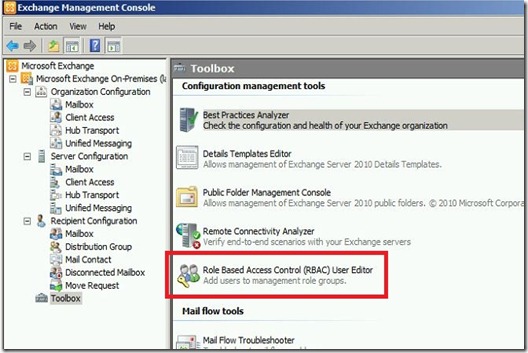
          ExchUM - RBAC Toolbox - markup

          Once logged in, select the “New…” button to create a new Role Group:
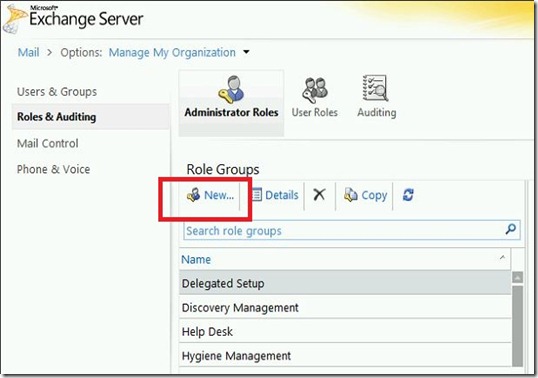
          ExchUM - RBAC New - markup

          Enter in the Role Group name: “UM Prompt Administrators” and select the “Add…” button to add roles:
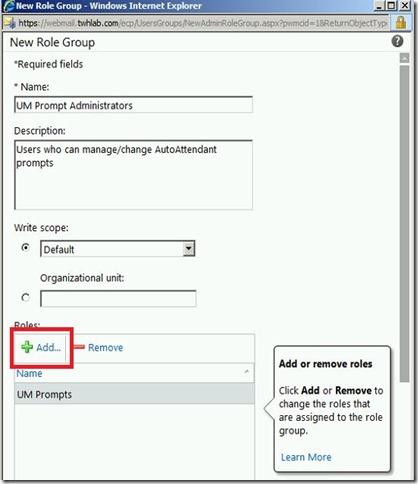
          ExchUM - RBAC New UM role 1 - markup

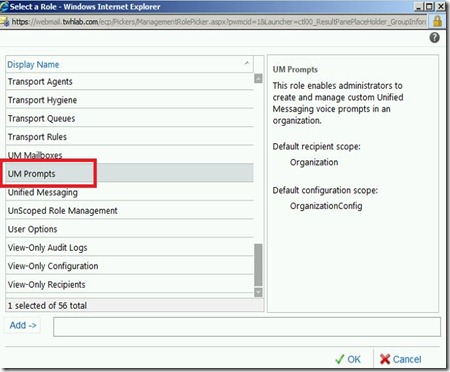
          Add the “UM Prompt” role:

          ExchUM - RBAC role add - markup

          Then add the users that will need to manage UM prompts":
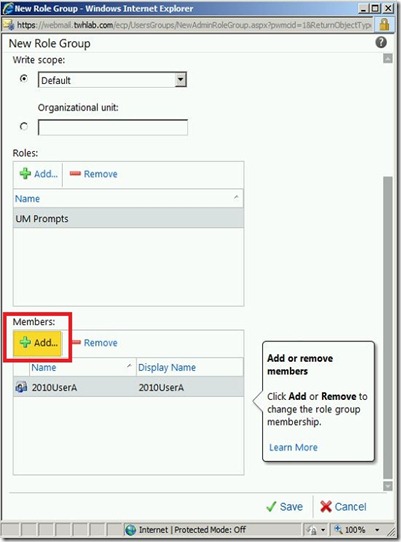
          ExchUM - RBAC New UM role 2 - markup

          This will create a new AD group in the "Microsoft Exchange Security Groups OU:
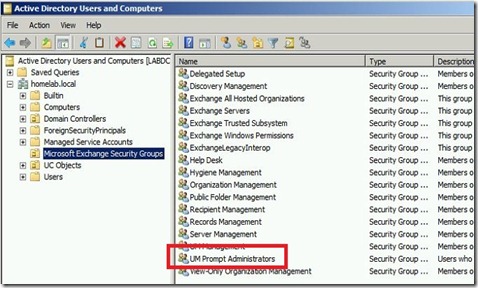
          ExchUM - AD group - markup

          Now you can manage users by using the ECP or directly through the AD group:
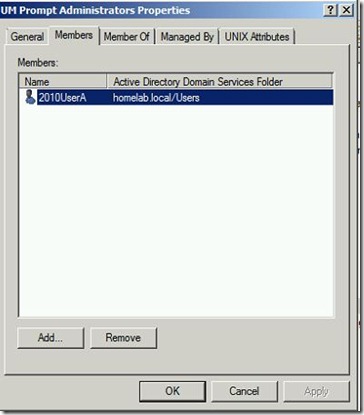
          ExchUM - AD group prop

          Enable the UM Dial Plan to allow TUI (telephone user interface) editing

          From the EMS, run:

          Set-UMDialPlan –identity “Dial Plan Name” –TUIPromptEditingEnabled $true

          ExchUM - cmd dialplan enable

          Seed the audio prompts with a custom audio file

          Before you can modify the audio prompts through the telephone, a custom greeting already has to be configured.  You will only be able to modify the prompts that have been changed from the default greeting.  The easiest way to do this is to select any of the .wav files already on the Exchange server.  The files are located in (if you have a different language pack installed, the “en” folder will be a different language abbreviation):

          <Program Files>\Microsoft\Exchange Server\V14\UnifiedMessaging\prompts\en

          To keep things organized and descriptive, I will copy one of the preexisting files and rename it to what the greeting will be.
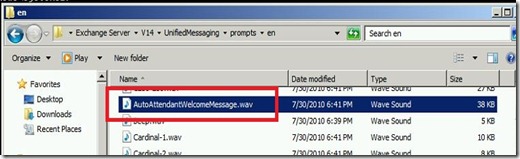
          ExchUM - file location wav file - markup

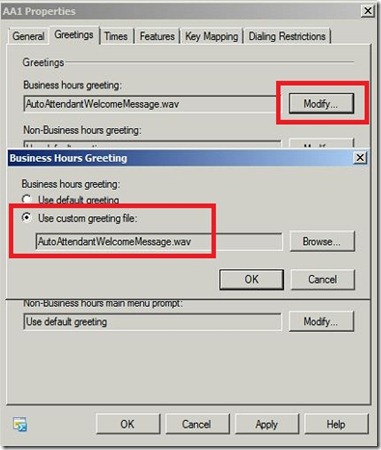
          Next, open the Auto Attendant and click the Greetings tab.  Then select the custom greeting file:
          ExchUM - AA cust greeting - markup

          Use telephone to modify audio prompts

          Now you are ready (or your delegated user) to modify the audio prompts.  Here is the procedure:

          1. Call the extension\phone number associated with the Auto Attendant that you want to modify
          2. While the initial greeting is playing (the one you just selected), press # then * on the telephone keypad
          3. You will then be prompted for your extension and PIN number.  This will authenticate you to change the audio prompt menu.
          4. At this time you will be presented with options to change the audio prompts that have been customized from the default greetings

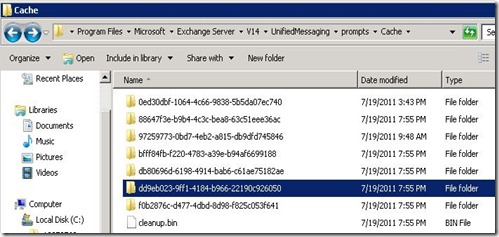
          The modified audio prompts will then be saved in the following location:

          <Program Files>\Microsoft\Exchange Server\V14\UnifiedMessaging\prompts\cache
          ExchUM - file location cust prompts

          This post described how to:

          1. Delegate regular users the ability to manage Auto Attendant audio prompts
          2. Use a regular telephone to modify and record new greetings for Auto Attendants